ReadySetPDF
FlagshipHot folders, VDP mail merge, automated booklet layout, fold-type proofs with die lines, and preflight. Runs locally on Windows so customer files and PHI never leave the shop.
Automated hot folders run overnight
A UR Print & Graphics product
ReadySetPDF eliminates the prepress bottleneck: hot folders, VDP mail merge, saddle-stitch booklets, fold-type proofs, and PDF preflight — 100% local on Windows. No cloud. No file-size caps.
Software suite
Professional Windows utilities from UR Print & Graphics — written by a print professional, not a generic PDF viewer with extra buttons.
Hot folders, VDP mail merge, automated booklet layout, fold-type proofs with die lines, and preflight. Runs locally on Windows so customer files and PHI never leave the shop.
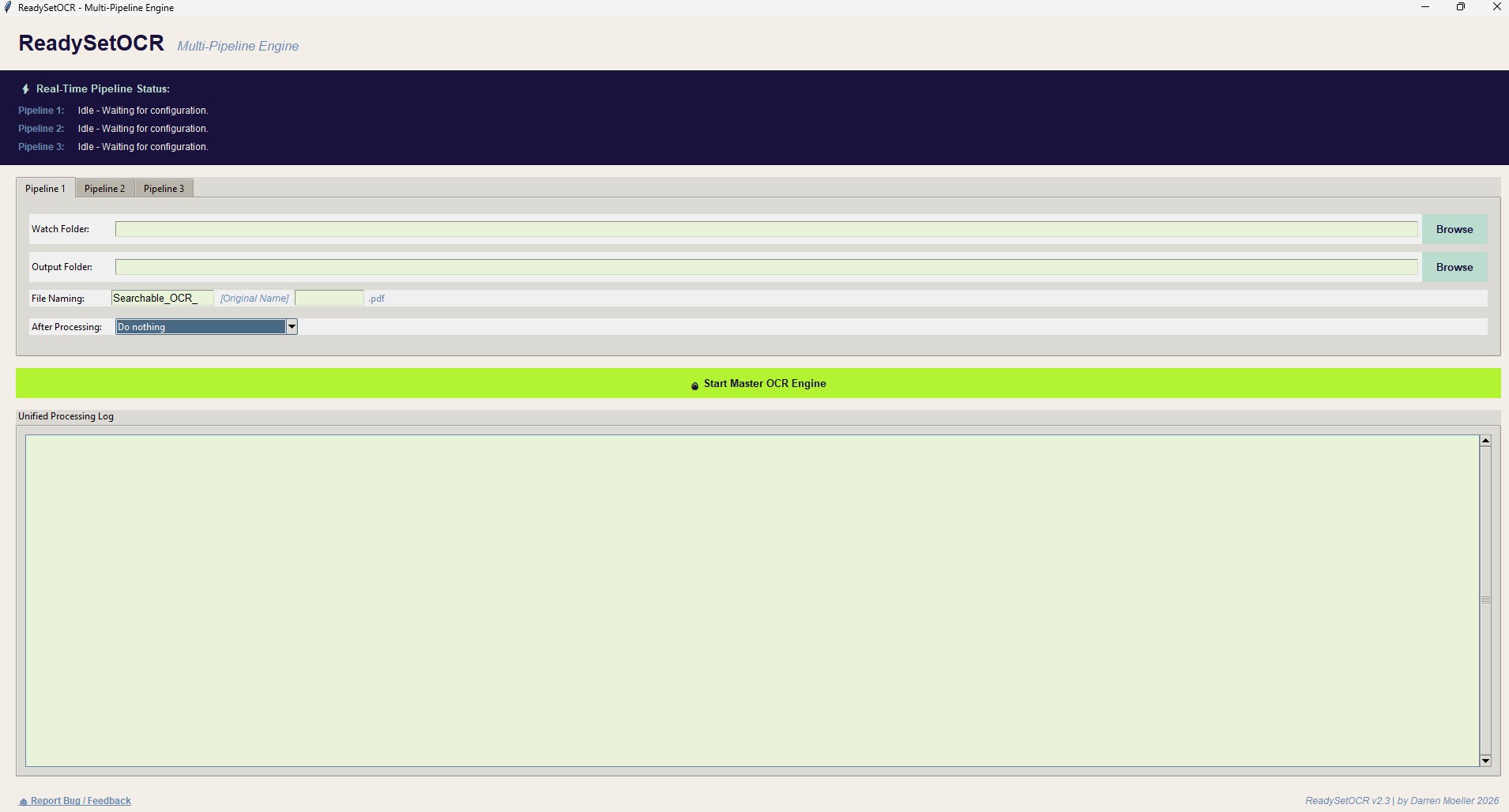
Standalone optical character recognition for multi-pipeline, live hot-folder OCR. Unzip and run the executable in the folder root.
Manual prepress is the silent margin-killer. ReadySetPDF replaces tedious layouts with automated precision so operators can handle twice the volume without adding headcount — and without layout errors that reprint.
The full prepress arsenal
Imposition, VDP, fold proofs, preflight, marks, and batch tools in one Windows workspace — the jobs shops actually run, not a cloud PDF editor.
Watch folders on your local network apply saved templates, impositions, and prepress checks unattended. A hot folder can reuse a stored envelope PDF and take only the spreadsheet. Drop files in before you leave — jobs are press-ready in the morning.
Link ODS, XLSX, or CSV columns to a PDF template: click a column, then the template. Address blocks actually place, with bold, italic, and underline. Mail merge prints in millimetres — including tight envelope windows — and runs 10,000+ records on your own hardware.
Set rows, columns, and gutter spacing, then step a single record into a multi-up press sheet. Anchor a selection so pieces stay locked when the grid changes. Built for business cards, tags, and labels on 12×18 and 13×19 stock.
Paginate multipage files into 2-up printer spreads with spine creep per sheet from your paper thickness. Outward moves toward the spine; inward opens the gutter. A 3×3 white-space anchor pads from the chosen cell. Monkey, Grid, and Booklet tabs can honor the TrimBox instead of the MediaBox.
Preview letter, tri-fold, gate, Z-fold, and other common bindery folds on the live page. Export a customer proof with die lines so finishing sees the same folds you quoted.
Scan incoming PDFs for missing fonts, low-resolution images, RGB versus CMYK, and trim or bleed box errors — before they cost a reprint.
Strip owner passwords and print-lock restrictions from client files so you can preflight, impose, and send to the RIP without a detour.
Merge dozens of PDFs into one optimized run, or apply crop marks and scaling to hundreds of files in a single pass.
Apply crop marks in black or white on Monkey, Grid, and Booklet, with positive or negative overlap so marks cross into trim or sit off it. Cutter L, registration, and dots align to the four corners.
Pull a page range, split a 10,000-page stream into press-sized chunks, or lift a single record out of a corrupted print file.
Force right-hand chapter starts, pad to booklet page counts, or fix duplexing so backs don't print on the wrong leaf.
Map non-standard client PDFs to Letter, Tabloid, or a custom size while keeping aspect ratio, centering art, and updating the trim box.
Extract text from flattened scans into CSV or TXT, or inject an invisible text layer for searchable archival PDFs — without sending files off-site.
The Windows workspace: stacked prepress steps, a live page monitor, and a visual VDP editor — not a browser tab.

Version 3.54 · September 19, 2026
Autoscale starts off, Source Trim packs on finished size, millimetre mail merge, and hot folders that reuse a stored envelope PDF. Earlier tools stay in.
Pages keep native size. Nothing is stretched to fill the cell.
Imposition uses the trimmed page. Gutter 0 means trims touch.
Overwrite the step or Add another. Stop hunting through tabs for a setting you already stacked.
The monitor no longer layers the wrong tool — cutter marks no longer sit on a Grid preview.
VDP prints in mm, including tight envelope windows.
Click a box to select it. Ctrl+Z undoes the last place.
The block lands on the template. Bold, italic, and underline apply.
LibreOffice, Excel, and plain CSV all feed the same mail-merge editor.
Keep the envelope PDF on file. Drop only the spreadsheet for the next run.
Collapsible MediaBox, CropBox, and TrimBox controls: keep original boxes, set CropBox to TrimBox, or clip extra margins to TrimBox. Applies to preview, export, and batch.
Creep is paper thickness; each inner signature adds that amount. Outward moves toward the spine; inward opens the gutter.
Same corner-to-center pad as Grid. Margins offset from the chosen cell.
Positive or negative overlap on Monkey, Grid, and Booklet printer’s marks — cross into trim, or keep a gap.
Crop marks on Monkey, Grid, and Booklet, plus cutter L and registration marks, in black or white.
Registration L, cross, and dots align with the four-corner L marks — no extra inward inset.
Inch (to 1/16″), mm, and point ticks. Hover shows distance from the left and top.
Default zoom fills the pane. Rulers are slimmer.
Anchor cells stay clickable. Help sits on the “?” instead of covering the pad.
Anchor a selection on the Grid tab so stepped pieces stay locked when you change rows, columns, or gutters.
Those tabs can now use the TrimBox, so imposition follows the trimmed page instead of the oversized MediaBox.
See letter, tri-fold, gate, Z-fold, and other common bindery folds on the live page before you send the job.
Export a customer or bindery proof with die lines so finishing matches the fold you quoted — not a guess from a flat PDF.
Duplicate (original) crop marks no longer appear on the final output PDF.
The live monitor now clips to the CropBox, not the oversized MediaBox, so what you see is the trimmed page.
The visual VDP editor and the other 3.5 tools ship in this build. Nothing was pulled.
Spreadsheet headers become sidebar tags. Click to place, drag to move, preview a merged record before you stack the step.
City, state, and ZIP sit on one City, ST ZIP line instead of three stacked fields. Double-click the block to remap columns.
90° and 270° swap the page box. Pages are no longer scaled or cropped back into the original width and height.
The real-time monitor updates while you edit those tabs — before the step is added to the stack.
Straight answers for shop owners comparing local automation to cloud PDF tools.
ReadySetPDF is Windows prepress automation software for small and mid-sized print shops. It handles hot folders, variable data printing (VDP), saddle-stitch booklet imposition, fold-type proofs with die lines, step-and-repeat, PDF preflight, crop marks, and batch processing — entirely on your own hardware.
Yes. Version 3.54 is a free download for Windows. Source is public on GitHub. A Pro license is planned; the current build is provided as-is during beta.
Yes. Files never upload to a browser or a cloud queue. That means no file-size caps, no wait on a shared server, and no PHI or customer lists leaving the shop — which matters for healthcare mail and other regulated work.
A hot folder is a watched directory. Drop a PDF in, and ReadySetPDF applies the template, imposition, and checks you saved for that folder. Version 3.54 can reuse a stored envelope PDF and take only the spreadsheet. Shops use it to run overnight work so morning shifts start with press-ready files instead of a prepress backlog.
Yes. Open ODS, XLSX, or CSV. Click a column, then the template; click a box to select it (Ctrl+Z undoes). Address blocks actually place, with bold, italic, and underline. Mail merge prints in millimetres, including tight envelope windows. Output page count is template pages times rows that contain data.
Yes. Fold-type previews cover common bindery folds such as letter, tri-fold, gate, and Z-fold. You can export a proof with die lines so the customer and the finishing department are looking at the same fold layout.
Yes. Creep is paper thickness; each inner signature adds that amount. Outward moves content toward the spine; inward opens the gutter. A 3×3 white-space anchor pads margins from the chosen cell, same as Grid.
Preflight reports look for missing fonts, low-resolution images, RGB versus CMYK color space, and incorrect trim or bleed box definitions — the errors that show up on press, not on a laptop screen.
ReadySetOCR is a companion Windows utility for live hot-folder OCR. Use it when you need a dedicated multi-pipeline watch folder for scans. ReadySetPDF also includes Tesseract OCR for one-off extraction and searchable PDFs.
Microsoft Windows. ReadySetPDF 3.54 installs with a setup executable. ReadySetOCR ships as a zip — run the exe in the unzipped folder. Neither tool requires a browser or an online account.
Yes. On import you can keep the original boxes, set CropBox to TrimBox, or clip extra margins to TrimBox. Those choices apply to preview, export, and batch. Monkey, Grid, and Booklet can also honor the TrimBox for imposition.
Autoscale starts off so pages keep native size. Source Trim packs on finished size; gutter 0 means trims touch. Click a stack step to open its pane (Overwrite vs Add). Live preview no longer layers the wrong tool. Mail merge prints in millimetres, including tight envelope windows. Click a column, then the template; click a box to select it (Ctrl+Z). Address Block actually places, with bold, italic, and underline. Opens ODS, XLSX, and CSV. A hot folder can reuse a stored envelope PDF and take only the spreadsheet. Earlier tools stay in: page geometry, booklet creep, fold-type proofs, and the 3.5 visual VDP editor.
Download ReadySetPDF free and start saving hours per job. Windows installer for version 3.54.
Requires Windows. Installer places ReadySetPDF under Program Files.